

DiskSpaceChart 2.5
Disk Space Chart lets you to quickly and easily work out disk space usage
Program info
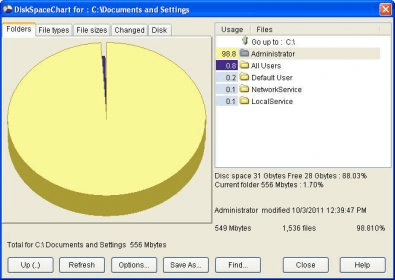
Personal computers use up free space and it's good to know what that space is being used for. I installed the free version of the DiskSpaceChart program to take a closer look at my own computer and found it easy to use as it displays a colored graphic pie chart with a list showing the percentage of space that each listed program takes up. The program is accessed from the standard context menu so all I had to do was right click on a drive or folder and select the ‘Chart' option to launch the program, which immediately began scanning my chosen file. The single window interface has the options button which, when clicked on, opened a small window offering choices for nested sub-folders.
Another useful feature the program offers is the 'Find' button, which, when selected, prompts the program to open presenting choices for searching for empty folders. The purchased version of the program takes this further by offering the ability of finding folders based on contents and size. The program also includes the 'Help' option that is easily accessed with one click at all times while using the program. The results shown can be saved in CSV format and clicking on the 'Refresh' button updates the usage display. This utility helped me to understand better how the space on my computer is used and I was especially impressed by its ability to find empty folders.
Pros
- Displays easy to understand results
Cons
- Nag screen in trial version
Details
Extensions

No information available
The data will be available later.


Comments